| .gitea/workflows | ||
| assets | ||
| packaging | ||
| src/neotalk | ||
| tests | ||
| .gitignore | ||
| .pre-commit-config.yaml | ||
| LICENSE | ||
| pyproject.toml | ||
| README.md | ||
| uv.lock | ||

neotalk
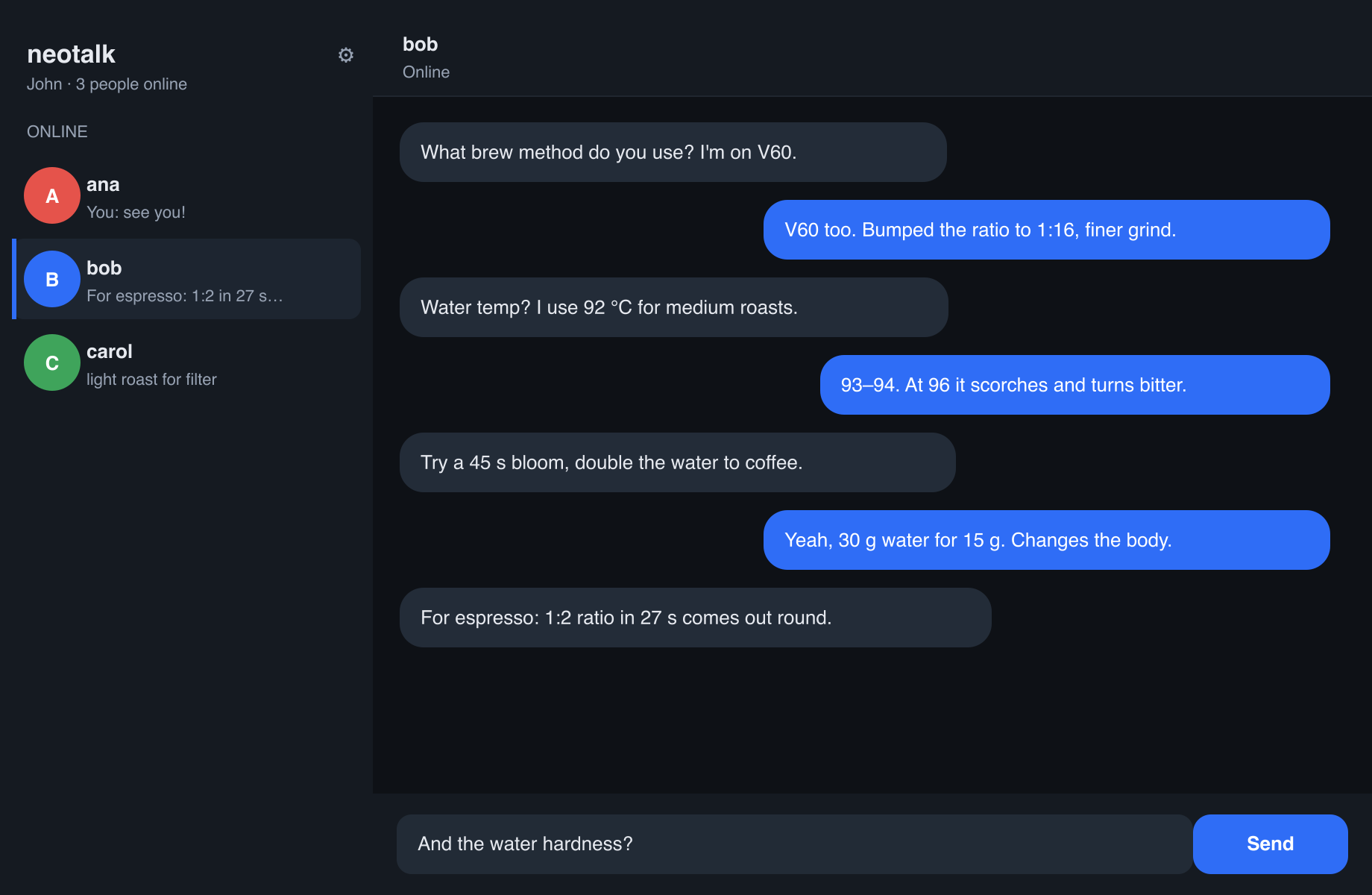
A modern peer-to-peer (P2P) chat over IP, with a graphical interface. Inspired
by the classic Unix talk.
- Negotiation (finding each other and ringing the doorbell) goes over UDP.
- The conversation goes over a direct TCP connection between the two clients.
- End-to-end encryption (X25519 + AES-GCM).
- No servers, no accounts, no groups. Nothing is stored: closing loses it.
- VPN friendly. Auto-discovery works on the local network; across a VPN (WireGuard, Tailscale…) you connect directly by address. See Connecting over a VPN.
Download
- macOS (Apple Silicon, signed and notarized): grab the latest
.zipfrom the releases page. Unzip and openneotalk.app, no extra steps. - Windows and from source: see the sections below.
Usage
uv run neotalk --alias yourname
Open another instance (on the same machine or another one on the local network) and they will find each other. Pick someone from the list, type, and press Enter.
Both people must be on the same local network for automatic discovery.
Connecting over a VPN (WireGuard, Tailscale…)
Automatic discovery uses multicast, which a VPN tunnel does not carry, so peers do not show up in the list on their own. There are two ways around it; both keep the conversation end-to-end encrypted over the tunnel.
Automatic (recommended)
Announce your presence by unicast to the VPN, so you appear in each other's list without typing addresses:
- Open the ⚙ panel, set Discover on (IP or subnet) to your VPN range (for
example
10.0.200.0/24) or directly to your friend's VPN IP, then Save. - That's it: you show up in each other's list and can click to talk. Only one side needs to set this; the other is answered automatically.
You can also pass it at launch: uv run neotalk --alias you --discover 10.0.200.0/24.
Manual (connect by address)
- One of you opens ⚙, sets a fixed Your port (e.g.
51821), Save, and shares their VPN IP + port (e.g.10.0.200.143:51821). The panel shows your port. (Or launch with--port 51821.) - The other opens ⚙, types that into Connect to host:port, and presses Connect.
Tip: over WireGuard, ICMP
pingmay be blocked even when TCP works, so "I can't ping them" does not mean neotalk won't connect.
Running on Windows
Two options. Both need uv, installed once from PowerShell:
powershell -c "irm https://astral.sh/uv/install.ps1 | iex"
Then get the code (or download the ZIP from the repository and unzip it):
git clone https://git.andros.dev/andros/neotalk.git
cd neotalk
Option A: just run it
uv run neotalk --alias yourname
uv downloads Python and every dependency the first time; later runs are instant.
Option B: build a standalone neotalk.exe
uv run --extra build pyinstaller --noconfirm --clean --distpath dist --workpath build/pyinstaller packaging/neotalk.spec
The result is a single file at dist\neotalk.exe. Double-click it to run, no
Python required, and copy it anywhere you like.
A Windows executable must be built on Windows: PyInstaller does not cross-compile from macOS or Linux.
Development
uv run --extra dev pytest        # tests
uv run --extra dev ruff check    # lint
Contributing
Contributions are welcome! Please see the contribution guidelines for instructions on how to submit issues or pull requests.
License
GPL-3.0-or-later.